The Overlapping Rectangles using CSS and Javascript
- 时间:2020-09-20 13:49:13
- 分类:网络文摘
- 阅读:131 次
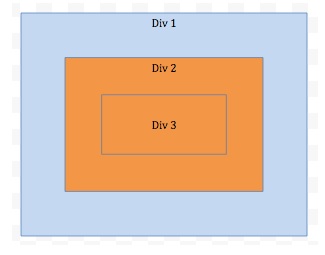
Make three rectangles as shown in the figure. Clicking on any rectangle should alert the name of the rectangle
Make three rectangles as shown in the above figure. Clicking on any rectangle should alert the name of the rectangle.
Three Rectangles in HTML Div Containers
The Three rectangles can be represented using HTML Div containers/elements. The outmost rectangle (also the biggest one) wraps the second biggest and so on.
1 2 3 4 5 6 7 | <div id="Div1"> <div id="Div2"> <div id="Div3"> </div> </div> </div> |
<div id="Div1">
  <div id="Div2">
    <div id="Div3">

    </div>
  </div>
</div>CSS
We can use the CSS to control how these rectangles look like e.g. the colour, the size etc.
1 2 3 4 5 6 7 8 9 10 11 12 13 14 15 16 17 18 19 20 21 22 23 24 25 26 | div { border-style: solid; border-color: grey; cursor: pointer; text-align: center; } div#Div1 { background-color: lightblue; width: 500px; height: 400px; } div#Div2 { background-color: orange; width: 400px; height: 300px; margin: 50px; } div#Div3 { background-color: transparent; width: 300px; height: 200px; margin: 50px; } |
div {
    border-style: solid;
    border-color: grey;
    cursor: pointer;
    text-align: center;
}

div#Div1 {
    background-color: lightblue;
    width: 500px;
    height: 400px;
}

div#Div2 {
    background-color: orange;
    width: 400px;
    height: 300px;
    margin: 50px;
}

div#Div3 {
    background-color: transparent;
    width: 300px;
    height: 200px;
    margin: 50px;
}Behavior in Javascript
Finally, we can use Javascript to define the clicking behaivor. We can define each Div’s onclick event but that is not an elegant solution as there will be duplicate code and you have to manually associate the behavior for each rectangle by ID explicitly.
1 2 3 4 5 6 7 8 | const divs = document.querySelectorAll("div"); for (let i = 0; i < divs.length; ++ i) { divs[i].addEventListener('click', function(i) { alert(divs[i].id); // avoid fired more than once for overlapping area event.stopPropagation(); }.bind(this, i)); } |
const divs = document.querySelectorAll("div");
for (let i = 0; i < divs.length; ++ i) {
    divs[i].addEventListener('click', function(i) {
        alert(divs[i].id);
        // avoid fired more than once for overlapping area
        event.stopPropagation();
    }.bind(this, i));
}The above Javascript will query all the Divs and add event listner (click) to each of them. Remember to call event.stopPropagation to avoid firing multiple events on the overlapping area.
Want to see how the above combines and works together in the JS playground?: https://jsfiddle.net/9mpjegL8/
–EOF (The Ultimate Computing & Technology Blog) —
推荐阅读:搜索引擎优化如何内容建设 牟长青个人博客因未备案关闭 电商网站怎样制作?有哪些问题需要注意? 求爸爸和小明的年龄 贴错的情况共有几种 求AB两个港口之间的距离 三个连续的自然数分别是多少 怎样安排车辆费用最低 求与圆面积相等的近似长方形的周长 已知半圆周长如何求半径
- 评论列表
-
- 添加评论